Reviewed · TOKYO TOURS
Japan: eSIM with Unlimited Local 4G/5G Data
Japan is easier with data. This eSIM gives you unlimited local 4G and 5G, so you can check train routes, translate menus, message home, and search for dinner without hunting for Wi-Fi. I like the quick QR-code setup and the chance to share data through a hotspot. The main catch is that your phone must support eSIM and be unlocked for foreign service.
I also like the choice between the full-speed Ultra plan and the 10 Mbps Lite plan. That makes the $10 starting price attractive for a short visit, though the final cost depends on your chosen duration and option. Keep in mind that this is data only, with no Japanese phone number, voice calls, or SMS.
In This Review
- Key points to know before you buy
- What this Japan eSIM actually provides
- Ultra versus Lite, and why the choice matters
- Installation starts before Japan, but service starts after arrival
- The QR-code warning can save you a stressful airport hour
- KDDI coverage, 5G, and the limits of mobile signals
- Hotspot sharing for couples and small groups
- Calendar-day billing makes late activation a poor bargain
- What the $10 price buys you
- Who should choose this eSIM
- A practical setup plan for your arrival
- FAQ
- Is the QR code on the booking voucher the eSIM code?
- Does the eSIM work before I arrive in Japan?
- How do I check if my phone supports eSIM?
- Does the eSIM include phone calls or SMS?
- What is the difference between Ultra and Lite?
- Can I share the eSIM connection through a hotspot?
- Should you book this Japan eSIM?
Key points to know before you buy
- The eSIM QR code arrives separately: It is emailed one day before your activity date, and it is not the QR code shown on the booking voucher.
- KDDI au provides the network: The service connects to Japan’s KDDI network after you arrive in the country.
- Ultra and Lite work differently: Ultra offers unthrottled 4G and 5G data, while Lite has unlimited data capped at 10 Mbps.
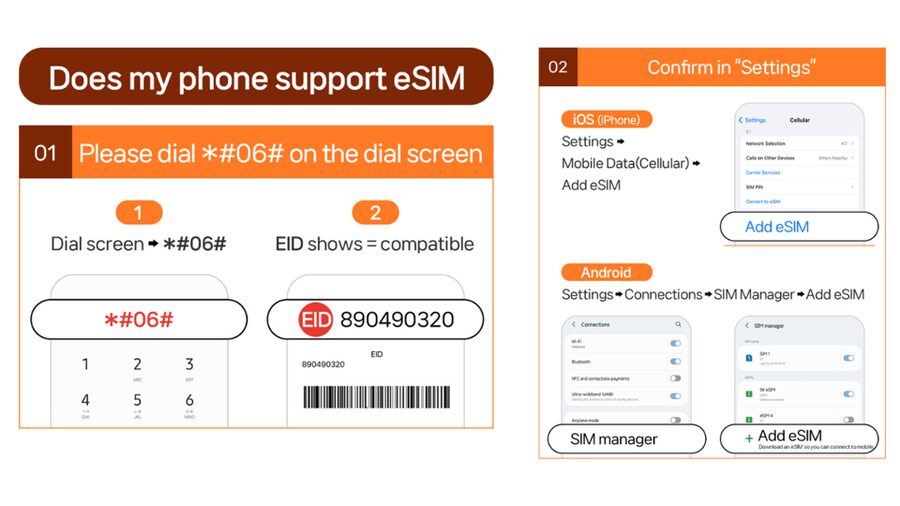
- Your phone needs an EID: Dial #06# and check that an EID appears. If it does not, your phone is not eSIM-compatible.
- Hotspot sharing has limits: Tethering is supported, but the Lite plan has a specific daily-style data allowance based on the plan length.
- Plan time follows calendar days: A first connection at 10 PM counts as a full day by midnight, so late-night activation can cost you useful time.
What this Japan eSIM actually provides
This is not a guided outing or a transport pass. There are no meeting points, sightseeing stops, or set departure times. You buy a mobile data plan, install it on your phone, and use Japan’s KDDI network during your chosen period.
That simple setup can make a big difference in Japan. You can use Google Maps or another map app, check train connections, translate signs, make restaurant searches, and send messages as soon as you need them. You do not have to wait for hotel Wi-Fi or rent a separate pocket Wi-Fi device.
The service covers Honshu, Japan, and the specifications describe coverage across Japan. The eSIM connects to the local network only after you arrive in Japan. Installing it before departure is useful, but you should not expect it to provide service at home or in the air.
You receive an eSIM QR code by email one day before the activity date. This detail matters. The QR code printed or shown on the GetYourGuide voucher is not the installation code, so do not scan the wrong one and assume the service has failed.
A few more options to weigh up in Tokyo
- Tokyo Disney Resort – Tokyo Disneyland & Tokyo DisneySea Park Tickets
★ 4.8 · 99,488 reviews - SHIBUYA SKY Ticket
★ 4.7 · 46,509 reviews - JR Whole Japan Rail Pass
★ 4.8 · 29,150 reviews
Ultra versus Lite, and why the choice matters
The two plan types are designed for different phone habits.
The Ultra plan provides unlimited local 5G and 4G data without throttling. If you plan to use your phone heavily, this is the cleaner choice. It suits frequent map use, video calls through data apps, cloud photo backups, streaming, and hotspot use, although hotspot access still comes with limitations.
The Lite plan also provides unlimited local data, but its maximum speed is 10 Mbps. That is usually enough for maps, translation, email, web pages, social media, and messaging. It may feel less comfortable for heavy video streaming or large downloads, especially if several devices share the connection.
Lite also comes with hotspot limits tied to the selected duration:
- 3-day plan: 3 GB
- 4-day plan: 3 GB
- 5-day plan: 4 GB
- 6-day plan: 5 GB
- 7-day plan: 6 GB
- 8-day plan: 7 GB
- 9-day plan: 8 GB
- 10-day plan: 9 GB
- 15-day plan: 15 GB
- 20-day plan: 19 GB
- 30-day plan: 30 GB
The supplied details list Lite plans from 3 to 10 days, while the hotspot table also includes 15, 20, and 30-day figures. Check the exact option shown at purchase, especially if you need a longer plan or intend to connect a laptop.
The $10 price is appealing for a short stay, but do not judge the value by the headline figure alone. Confirm whether your selected option is Ultra or Lite, how many days it covers, and whether you need more than the included hotspot allowance. For a solo visitor using maps and messages, Lite may be plenty. For heavy data use, Ultra is worth closer attention.
Installation starts before Japan, but service starts after arrival
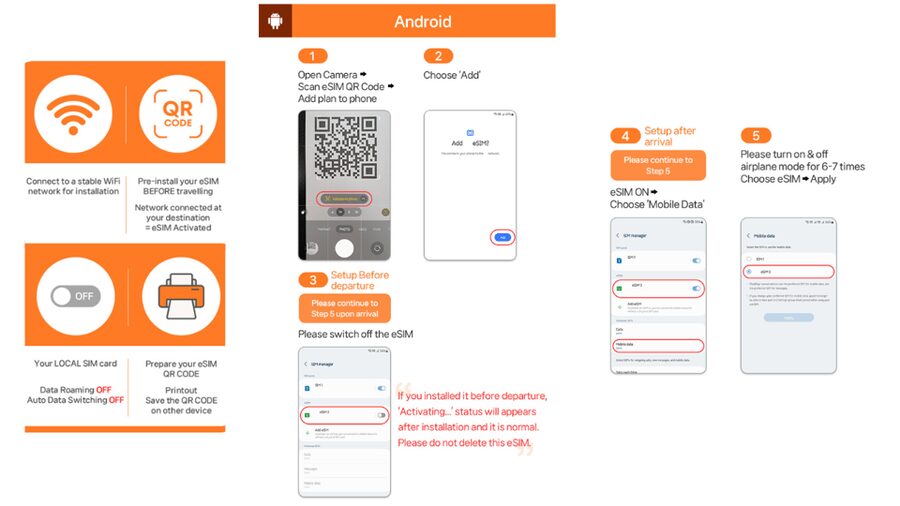
The installation process is fairly direct. Once the separate email arrives, you scan the QR code through your phone’s cellular or SIM settings. The eSIM is then added to your device, ready to connect once you reach Japan.
I recommend doing the installation before leaving home, while you have reliable Wi-Fi. That gives you time to check the setup and contact the supplier if anything goes wrong. It also keeps you from trying to troubleshoot at an airport with a low battery and a suitcase in tow.
Do not remove your regular SIM too quickly. Keep it available for your normal number unless you have a clear reason to disable it. The Japan eSIM does not include voice calls or SMS, so your original number may still be useful for account codes or messages, depending on your home plan.
After landing, turn on the Japan eSIM and allow it to use cellular data. The service should connect to KDDI after you arrive. You should also check that your phone is using the eSIM for mobile data rather than your home line, since accidental roaming charges can spoil a cheap phone plan.
The QR-code warning can save you a stressful airport hour
The separate email delivery is the most important booking detail. The eSIM code arrives one day before the activity date, not necessarily at the moment you pay. If you book at the last minute, keep an eye on your inbox and spam folder.
If your phone says QR code is invalid, do not assume the eSIM is unusable. The provided troubleshooting advice says to open the phone’s SIM settings and check if a new eSIM has already appeared.
On an iPhone, go to Settings, then Cellular. On Android, go to Settings, Connections, and SIM Manager. If a new eSIM appears, it may have installed despite the error message.
If the problem continues, contact the supplier through the listed email or WhatsApp support. Save the setup guide before departure if possible. The supplier provides an online guide and FAQ, which is helpful when you are working through unfamiliar phone menus.
One strict rule matters: the QR code must be installed and activated within 30 days of purchase. Refunds are not accepted after the eSIM QR code has been sent. That makes it wise to buy close enough to your departure date that you can use the plan within the allowed period.
A completely different kind of day out:
- Mt Fuji and Hakone 1-Day Bus Tour Return by Bullet Train
★ 5.0 · 26,383 reviews - TOKYO SKYTREE® Ticket
★ 4.7 · 25,136 reviews - teamLab Borderless Tickets: MORI Building DIGITAL ART MUSEUM
★ 4.7 · 24,126 reviews - teamLab Planets TOKYO Ticket
★ 4.7 · 21,663 reviews
KDDI coverage, 5G, and the limits of mobile signals
The eSIM uses KDDI, also known as au, for local service. The specifications promise 4G and 5G data, but the connection you receive depends on your location and the phone’s access to the network.
You may see 4G instead of 5G indoors, underground, or in crowded places. That is normal and is specifically noted in the service information. A subway ride may still have useful coverage in many places, but no mobile plan can promise a strong signal in every tunnel or station.
The practical point is that 4G is often enough for the tasks you need most. Train maps, translation tools, ticket pages, and messaging do not require the fastest possible connection. If you care about speed for large files or high-quality streaming, choose Ultra and expect occasional changes between 5G and 4G.
The service has earned a 4.5 rating from 163 ratings, and the most praised feature is simple: it works where people need it. Aaron found the signal available even on the subway. That does not guarantee service on every underground section, but it gives you a useful sense of how the connection can perform during a normal Japan trip.
Hotspot sharing for couples and small groups
You can share the connection with other devices, which is useful if a partner or friend does not have a working data plan. Angelica found it possible to share the connection with other phones and still get good coverage.
This can improve the value of one eSIM, but you should treat hotspot access as a limited extra, not a replacement for a full home internet connection. The Lite plan includes the specific hotspot amounts listed above. Once you use that allowance, sharing may become restricted even though the phone’s own data remains described as unlimited.
For two people who mainly need maps and messages, one shared connection might work well. For a group using several phones, tablets, or laptops, each person may need a separate plan. Ultra is the better fit if you expect regular tethering, but confirm the exact hotspot terms for the option you select.
Calendar-day billing makes late activation a poor bargain
The service counts usage by calendar days from the first connection to KDDI in Japan. A connection at 10 PM counts as one full day by midnight.
That rule is easy to overlook. If you land late at night, you might wait until the next morning to activate the eSIM, as long as you can manage without mobile data overnight. This is especially useful on a short three-day or four-day plan.
On the other hand, you may want service immediately after landing for directions or transport information. In that case, activate when you need it, but understand that the first day will still count in full.
Plan the start date around your real schedule, not just your flight date. A long arrival day followed by a very early departure can reduce the practical value of a short plan.
What the $10 price buys you
At around $10 per person, this is a low-cost way to get mobile data in Japan. You avoid a physical SIM card, a trip to a shop, and the need to return a rental device. You also avoid carrying another piece of equipment that needs charging.
The best value comes when you want a straightforward data connection for a short visit. A three-day or four-day plan can cover a quick stop in Japan, while the longer options suit an extended stay. The Ultra plan may justify a higher price if your phone is central to your trip and you do not want a speed cap.
The price is less compelling if your phone is not compatible, if it is locked to your home carrier, or if you need a Japanese phone number. This product does not provide calls or SMS, so it cannot replace every type of local mobile service.
It is also not a magic answer for every group. If you need a large shared connection for laptops and multiple phones, examine the hotspot limits first. A cheap personal plan can become less useful when several devices depend on it.
Who should choose this eSIM
I would consider this plan a good fit for:
- Short-term visitors who want quick mobile data without a physical SIM
- People who rely on maps, translation, train information, and messaging
- Visitors with an unlocked, eSIM-compatible phone
- Couples who need occasional hotspot sharing
- Anyone who wants to install the plan before flying and connect after landing
- Heavy data users who prefer the Ultra plan without a speed cap
I would be more cautious if you need voice calls, SMS, or a Japanese phone number. I would also think twice if your device is older or if you cannot confirm its eSIM support before purchase.
Before paying, dial #06# on your phone. If an EID appears, the phone supports eSIM according to the supplied instructions. You must also confirm that the phone is unlocked for a foreign SIM or eSIM. These checks are more important than the price.
A practical setup plan for your arrival
Before your trip, complete four checks:
- Confirm that your phone shows an EID.
- Confirm that it is unlocked for foreign SIM or eSIM service.
- Install the eSIM using the separate email QR code when it arrives.
- Save the supplier’s setup guide and support contact details.
After landing, select the Japan eSIM for mobile data and wait for it to connect to KDDI. If the phone displays an invalid QR-code message, check Cellular on iPhone or SIM Manager on Android before trying to install the code again.
Use Wi-Fi for large downloads and photo backups when practical. That keeps your connection responsive and makes the hotspot allowance last longer. For normal navigation and messages, the plan should be much easier than searching for public Wi-Fi at every stop.
FAQ
Is the QR code on the booking voucher the eSIM code?
No. The eSIM QR code is delivered separately by email one day before the activity date.
Does the eSIM work before I arrive in Japan?
No. The eSIM connects to the local KDDI network after you arrive in Japan.
How do I check if my phone supports eSIM?
Dial *#06# on the phone. If an EID appears, the device supports eSIM according to the provided instructions.
Does the eSIM include phone calls or SMS?
No. The plan includes local mobile data only. Voice calls and SMS are not included.
What is the difference between Ultra and Lite?
Ultra provides unlimited 5G and 4G local data without throttling. Lite provides unlimited local data with a maximum speed of 10 Mbps.
Can I share the eSIM connection through a hotspot?
Yes, hotspot sharing is supported with limitations. Lite has specific hotspot allowances based on the selected plan duration.
Should you book this Japan eSIM?
I would book it if you have an unlocked, compatible phone and want an inexpensive data connection without handling a physical SIM. The easy QR setup, KDDI coverage, and useful hotspot feature make it practical for maps, translations, messages, and daily trip planning.
Choose Ultra if you expect heavy data use or dislike speed limits. Choose Lite if your needs are modest and you are happy with 10 Mbps. Just watch the calendar-day billing, install the correct QR code, and remember that the service does not include calls or texts. For many short Japan trips, that small bit of preparation buys a lot of freedom.
Just added in Tokyo
- A One-of-a-Kind Sushi Experience in a Special Place of Japan★ 5.0 · 15 reviews
- Tokyo Cute Bento Cooking Class – Make a Kawaii Character Lunchbox★ 5.0 · 126 reviews
- Japanese Home Cooking Class & Walk in Todoroki Temple Tokyo★ 5.0 · 88 reviews
- Japan Tokyo Tower Observatory Deck E-Ticket★ 4.0 · 34 reviews
- Catch a Baseball Game in Tokyo with a Local – Tickets Included★ 5.0 · 24 reviews
- JDM Experience with Fast&Furious RX-7 (English speaking Driver)★ 5.0 · 57 reviews
- Tokyo Private Day Tour by Car with English speaking Driver Guide★ 4.0 · 29 reviews
- Japan Classic 10 Day – One Life Adventures★ 5.0 · 129 reviews
Tokyo Tours, compared.

Tokyo Disney Resort – Tokyo Disneyland & Tokyo DisneySea Park Tickets
Read our review →

Mt Fuji and Hakone 1-Day Bus Tour Return by Bullet Train
Read our review →

teamLab Borderless Tickets: MORI Building DIGITAL ART MUSEUM
Read our review →