

Reviewed · AIRPORT TRANSFERS
Japan Unlimited WiFi Router – Narita Airport Pickup
Arrive connected, not confused. This Narita Airport WiFi rental gives you a simple way to get online across Japan, with airport pickup, 4G LTE service, and a handy power bank included. I like the easy counter pickup and the chance to connect several devices without hunting for a SIM card. The main catch is the 3GB daily high-speed limit, plus mixed information about whether five or ten devices can connect at once.
You can rent the router for three to 30 days, so it works for both a short Tokyo stop and a longer Japan visit. At $15.85 per person, it can be good value for families or small groups sharing one connection, though you need to collect it as planned because missed pickup refunds are not provided.
In This Review
- Key points to know before you book
- Why a pocket WiFi router can help in Japan
- Picking up the router at Narita Airport
- Getting online after collection
- Using 4G LTE around Japan
- The included power bank is more useful than it sounds
- Is $15.85 a good price?
- What the customer feedback tells you
- Who should rent this WiFi router?
- Booking and cancellation details worth remembering
- Should you book it?
- FAQ
- Where do I pick up the WiFi router?
- Are the pickup counters inside airport security?
- How long can I rent the router?
- What does the rental package include?
- Does the router provide 4G LTE?
- How much high-speed data is included each day?
- How many devices can connect at once?
- Can I use the router throughout Japan?
- What happens if I do not collect the router?
- Can I cancel for a full refund?
Key points to know before you book
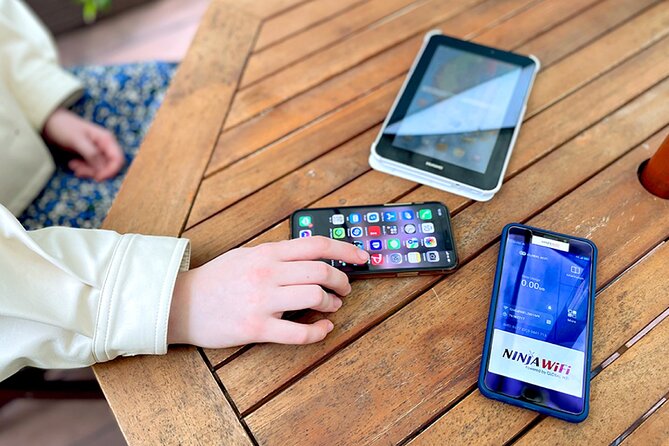
- Pick up at Narita Terminal 1 or Terminal 2: The counters are outside airport security, making collection possible after you clear the arrival formalities.
- 4G LTE access across Japan: Use Google Maps, messaging, social media, and other online services while moving around the country.
- Three to 30 rental days: Choose a period that matches your trip rather than paying for a fixed long-term plan.
- Power bank included: This is especially useful because a mobile router needs its own battery during long sightseeing days.
- High-speed data is capped at 3GB per day: After that limit, your connection may be slower, so heavy video use needs care.
- Device capacity needs checking: The highlights say up to 10 devices, while the operating details say up to five at once.
Why a pocket WiFi router can help in Japan
Japan is easy to explore, but getting around often means checking train routes, station exits, restaurant locations, and opening times. A working data connection saves you from searching for public WiFi every time you leave a station.
This rental gives you a portable hotspot rather than a SIM card installed in your phone. That matters if you want to keep your home number and regular mobile service active. You connect your phone, tablet, or laptop to the router by WiFi, then carry the small unit with you.
I especially like this setup for couples, families, and small groups. One rental can serve several devices, which may cost less than buying separate data plans for everyone. You also avoid the need to check if your phone is unlocked or compatible with a Japanese SIM.
The tradeoff is one more item to charge and carry. If the router battery runs low, your connection goes with it. The included power bank helps, and it was one of the most praised parts of the service, but you still need to remember the router and battery each day.
More airport transfers in Narita:
- Airport transfer: Narita, Haneda (Tokyo), HND-NRT Airport shuttle
★ 4.5 · 26 reviews - Mt Fuji Private Tour with English Speaking Driver
★ 5.0 · 861 reviews - Mt. Fuji Day Trip from Tokyo with English Speaking Driver Guide
★ 5.0 · 443 reviews
Picking up the router at Narita Airport

The experience begins at Narita International Airport, near Tokyo. You can collect the package at a counter in either Terminal 1 or Terminal 2. The counters are outside airport security, so you need to complete pickup before entering any secure departure area.
The package includes:
- WiFi router
- USB cable
- Adapter
- Power bank
The pickup process is meant to be quick. One particularly positive account describes arriving at the counter to find the router already packed and ready. Setup was also described as easy, which is exactly what you want after a long flight.
Your confirmation arrives at booking, and the product uses a mobile ticket. Keep the booking details easy to access on your phone. Since you need to collect the device at the airport, do not treat this as a service you can simply start later without planning.
A serious point deserves plain wording: there is no refund for failing to collect the router. If your flight changes, your arrival terminal shifts, or you decide to use another connection, you could lose the amount paid. Check your airport plans before booking.
Getting online after collection
Once you have the router, you can use it to connect phones, tablets, and other WiFi-enabled devices. The setup is presented as straightforward, and the included cable and adapter give you the basic equipment needed to charge the unit.
The service uses a 4G LTE connection. That is suitable for everyday tasks such as checking Google Maps, posting to Facebook or Instagram, sending messages, and watching YouTube. The practical benefit is not flashy. It is being able to find the right station exit or check directions without stopping your day to search for a connection.
The supplied details give two different device limits. The highlights say the hotspot can connect up to 10 devices, while the operating description says up to five devices at once. That difference is important. If you are a group of two or three, it should not create much concern. If you are counting on one router for a larger party, confirm the current limit before relying on it.
Keep the router reasonably close to the devices using it. The information does not give a specific range, so you should not assume everyone in a large group can split up and remain connected. A shared hotspot works best when you stay together.
Using 4G LTE around Japan

The service is designed for use throughout Japan, not just in Tokyo or around Narita. That makes it useful for a trip that includes several cities, since you do not need to arrange a new connection each time you move on.
Online maps are one of the clearest benefits. Japan’s rail system is efficient but can feel complicated when you are tired, carrying luggage, or standing in a large station. A connection lets you check routes and locations as you go. Social media and messaging work too, and the service specifically includes access for platforms such as Facebook and Instagram.
Still, the word unlimited needs a close look. High-speed data is limited to 3GB per day. That is a reasonable amount for maps, messages, web searches, and moderate social media use. It may not be enough if you stream lots of video, download large files, use cloud backups, or connect several people who all watch YouTube.
I would treat the router as a travel tool, not a replacement for home broadband. Download large maps, entertainment, or work files when you have a faster fixed connection. Use the router for the tasks that matter while you are out: directions, translation searches, reservations, and staying in touch.
A few more options to weigh up in Narita
- Narita Airport (NRT) Private Transfer to Central Tokyo
★ 4.5 · 300 reviews - Private arrival Transfer from Narita Airport(NRT) to central Tokyo city
★ 4.5 · 128 reviews - 14 Days Japan Panoramic (Private 3 Star Hotels) by Stunning Tours
★ 4.7 · 64 reviews - Narita Airport(NRT): Private Transfer to Tokyo/Yokohama 1-9pax
★ 5.0 · 47 reviews
The included power bank is more useful than it sounds

The power bank is not a luxury extra. A portable router needs power, and sightseeing days can run from breakfast through late evening. If you use the hotspot steadily, the battery becomes part of your daily planning.
The included power bank gives you a way to recharge while away from your accommodation. That makes the package more practical than a router alone. You still need to carry both pieces, and you may need to charge the power bank itself, but it reduces one common worry.
The package also includes a USB cable and adapter. You do not need to arrange those basic accessories separately. Because the listing does not provide battery-life figures, charging time, or power-bank capacity, I would avoid assuming the router will last for a full day without support.
Is $15.85 a good price?

At $15.85 per person, the value depends on how many people share the connection and how long you rent it. A solo visitor may compare the price with a local data plan or eSIM. A couple or family can spread the cost across several users, making the rental more attractive.
The rental period ranges from three to 30 days. This is useful because you can match the booking to your actual trip instead of paying for a standard seven-day or two-week package. A three-day rental makes sense for a short stop, while a longer period covers an extended stay.
Price alone does not tell the whole story. Airport pickup saves you from arranging delivery before your trip, and the package includes the router, charging equipment, and power bank. Those practical items add value, especially if you do not want to research Japanese mobile plans.
There is also a risk. The no-refund rule for missed collection means the cheapest option is not always the best option if your plans are uncertain. You can cancel for a full refund up to 24 hours before the experience start time, but changes or cancellations inside that window are not accepted.
What the customer feedback tells you

The overall rating is 3.4 out of 5 from 15 ratings, so the service has a mixed record rather than a spotless one. The strongest positive experience focuses on speed, simple setup, reliable use, and the bonus of the power bank. Those are the parts that matter most after a long arrival.
The negative account describes a failed delivery to a hotel and an inability to reach someone about the missing router. That problem is worth noting, but this product is specifically for pickup at Narita Airport. Do not confuse hotel delivery with the airport collection option described here.
The airport pickup format may actually avoid the delivery problem, since you receive the equipment directly at a designated counter. It does not remove the need to verify the terminal and allow time to find the counter. The counters are outside security, which is convenient for arrivals but means you should not expect to collect the unit after proceeding into a restricted area.
One other comment praises traditional Japan and street food, but it does not provide useful information about the router itself. I would not use that comment to judge connection quality or customer service.
Who should rent this WiFi router?

I would consider it for:
- Families who want several phones online through one connection
- Couples who plan to use maps and messaging throughout the day
- Visitors who do not want to change their phone SIM
- People visiting Japan for three to 30 days
- Anyone who values airport pickup over arranging a delivery
It may be less suitable for a solo visitor who uses very little data and already has a good international phone plan. It is also a poor match for someone who expects unlimited high-speed video streaming, since the daily high-speed allowance is 3GB.
Groups should pay close attention to the device-limit conflict. The material gives both five and ten connected devices. For a small group, that may not matter. For a larger party, confirm the current rule before purchase.
Most people can participate because this is a self-service equipment rental rather than a physically demanding activity. The maximum listed group size is 10 people, though that does not necessarily mean one router will perform well for 10 simultaneous users.
Booking and cancellation details worth remembering
You receive confirmation at the time of booking, and the ticket is mobile. Keep the confirmation accessible when you arrive at Narita.
The rental lasts approximately three to 30 days, depending on your selection. Pickup and return counters are outside airport security, and the service is near public transportation.
Free cancellation is available if you cancel at least 24 hours before the experience start time. Canceling later does not qualify for a refund, and late changes are not accepted. The cutoff uses local Japan time, so check the exact deadline rather than relying on your home time zone.
The experience provider is Vision Inc. The service is promoted under the NINJA WiFi name.
Should you book it?
Book this router if you want a simple airport handoff, shared internet for a small group, and a power bank included in the package. I like the three to 30-day choice and the practical help of having maps and messages available from the moment you begin your Japan trip.
Before paying, confirm three things: your Narita terminal, the counter location outside security, and the number of devices currently allowed. Also decide whether 3GB of high-speed data per day fits your habits.
I would choose this for a couple or family that wants reliable everyday access without dealing with SIM cards. I would look elsewhere if you are a heavy video user, need guaranteed service for a large group, or have uncertain arrival plans and may miss pickup. The product can make Japan easier, but only if you treat the router as essential luggage and collect it on time.
FAQ
Where do I pick up the WiFi router?
You pick it up at Narita International Airport, at a counter in either Terminal 1 or Terminal 2.
Are the pickup counters inside airport security?
No. The pickup and return counters are located outside airport security.
How long can I rent the router?
The available rental period ranges from approximately three to 30 days.
What does the rental package include?
The package includes a WiFi router, USB cable, adapter, and power bank.
Does the router provide 4G LTE?
Yes. The router provides a 4G LTE WiFi connection for use in Japan.
How much high-speed data is included each day?
High-speed data is limited to 3GB per day.
How many devices can connect at once?
The supplied details are inconsistent. The highlights say up to 10 devices, while the operating information says up to five devices at once. Confirm the current limit before booking if this matters to your group.
Can I use the router throughout Japan?
Yes. The service is intended to provide WiFi access anywhere in Japan.
What happens if I do not collect the router?
A refund will not be provided if you fail to collect the WiFi router.
Can I cancel for a full refund?
Yes, if you cancel at least 24 hours before the experience start time. Cancellations made less than 24 hours in advance are not refunded, and late changes are not accepted.
Just added in Narita
- Tokyo to Takayama – 13 days by On The Go Tours★ 4.4 · 5 reviews
- Splendours of Japan (Takayama, Takayama Festival) 9-Day Tour by Trafalgar★ 4.1 · 14 reviews
- 9 Days Japan Golden Tour Package WITH OISHI PARK by Delightful Travel★ 4.7 · 3 reviews
- Discover Japan on a Budget: 8-Day Ultimate Starter by Vio Travel★ 2.5 · 2 reviews
- Classic Japan 11-Day Tour by Trafalgar★ 4.0 · 1 review
- Best of Japan – 8 days by On The Go Tours★ 3.8 · 3 reviews
- 14 Days Japan Panoramic (Private 3 Star Hotels) by Stunning Tours★ 4.7 · 64 reviews
- 12 Days Summer Tokyo and Hokkaido Tour by UME Travel★ 5.0 · 2 reviews
Airport Transfers, compared.

Mt Fuji Private Tour with English Speaking Driver
Read our review →
Mt. Fuji Day Trip from Tokyo with English Speaking Driver Guide
Read our review →Mt. Fuji Private Tour with English Speaking Driver
Read our review →
Tokyo Private Sightseeing Tour by Car and English Speaking Driver
Read our review →
Private guided hidden gems tour by local English speaking driver
Read our review →
Private Unforgettable Mt Fuji Tour with English Speaking Driver
Read our review →
Private Tour to Mt Fuji and Hakone with English Speaking Driver
Read our review →
Tokyo Private Sightseeing Tour by Car – English speaking driver
Read our review →Browse the lists this tour appears in